
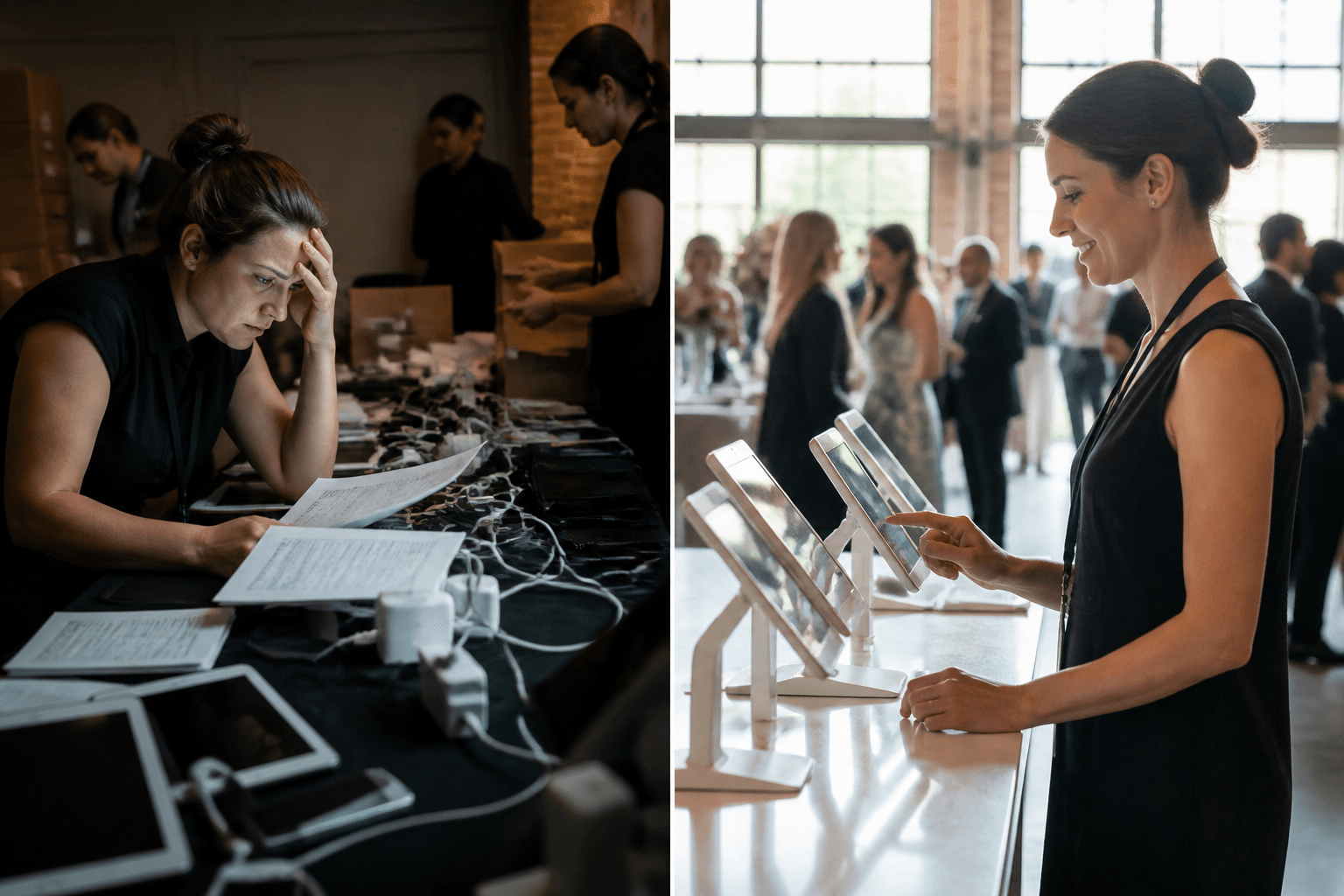
iPad rentals for events
Why bundled iPad rentals for events beat piecing together separate vendors
iPad rentals for events work best when bundled with POS and Wi-Fi in one shipment.
Key Takeaways
Fully configured bundles arrive with apps, Wi-Fi credentials, and content pre-loaded, so check-in and registration devices work together the moment the box opens.
Matching your iPad count to guest volume before booking prevents check-in bottlenecks at galas, conferences, and festivals.
One partner handling devices, POS, printers, and scanners means one point of contact for support, returns, and insurance instead of chasing several vendors after the event.
Comparing rent-vs-buy costs matters, but for short-term events a bundled rental still beats owning and maintaining separate hardware for occasional use.
Three vendors. Three delivery windows. Three invoices, three sets of instructions — one gala that starts at 7 PM sharp whether the Wi-Fi router shows up or not. That's the reality for a lot of planners who source their check-in tablets, payment terminals, and connectivity from separate companies because nobody told them there was another way.
Here's what most people miss: the device is rarely the problem. It's the seams between vendors — the tablet that doesn't know the printer exists, the router that arrives a day late, the volunteer trying to remember three different logins ten minutes before doors open. Piecing together a setup this way feels efficient on paper — it quietly adds hours of coordination work that nobody put on the budget.
Instead of managing separate contracts and hoping everything lines up on delivery day, one order arrives already working together — devices, stands, payment hardware, and connectivity configured as a single kit. For a nonprofit team running a gala on volunteer power, or a festival crew juggling dozens of vendors, that difference shows up the moment the boxes get opened.
The Real Cost of Renting Devices, Payment Hardware, and Wi-Fi From Different Companies
Picture a festival three weeks out: iPads booked with one company, card readers from another, and a router coming from a third vendor who won't confirm a ship date.
Hidden Coordination Time Nobody Budgets For
Every extra vendor means another appointment to schedule, another contract to read, another status email to chase. Someone on staff — often the person already juggling volunteers and vendor tables — ends up spending hours just tracking three separate deliveries instead of running the event.
What Happens When One Vendor's Timeline Slips
A single delay anywhere in the chain stalls everything else.
Devices arrive fine, but the payment terminals get stuck, and now nothing works together on setup morning. There's no backup plan when three companies aren't talking to each other, and no single number to call when it goes sideways.
Comparing a Single Invoice to Three Separate Contracts
One invoice, one delivery window, one point of contact beats three of everything. Separate vendors also mean separate insurance terms, separate return windows, and separate support hours — details that pile up fast during a busy season.
What a Fully Configured iPad Bundle Actually Includes
One box. One tracking number. One point of contact. That's the whole pitch behind a bundled setup, and it's why event planners keep circling back to it once they've tried piecing together gear from three different vendors. A bundle means the tablets, the connectivity, and the accessories all arrive as a single working system instead of a pile of parts someone on your team has to assemble at 7 AM.
Devices, Stands, Cases, and Chargers as One Kit
Every device in a bundled order ships with the stand, case, and charger it's actually meant to pair with — not a generic accessory grab bag. That matters more than it sounds; mismatched chargers and loose cases are the small stuff that eats an hour of setup time. For a bigger footprint, teams can rent iPad Pro for event use and get the larger-screen kits paired the same way.
Apps, Wi-Fi Credentials, and Content Pre-Loaded Before It Ships
The apps are already installed. The Wi-Fi credentials are already saved. Any sponsor content or check-in software is already loaded before the box ever leaves the warehouse. Nobody on your volunteer crew should be typing passwords into forty devices the morning of doors-open.
Matching POS, Printers, and Scanners to the Same Order
POS terminals, receipt printers, and badge scanners get matched to the same order and configured to talk to each other. That's the difference between a check-in table that runs itself and one that jams by 6:15.
How Separate Vendors Create Gaps at Check-In, Registration, and Point of Sale
Ever tried running a registration table, a check-in line, and a payment station with three different rental companies behind them? It rarely goes well. One vendor drops off tablets that need setup on-site, another ships a POS kiosk with no printer paired to it, and a third sends scanners nobody tested against your ticketing platform. Every gap between those shipments becomes a gap in your event, usually noticed right when guests start arriving.
Devices That Don't Talk to Each Other Out of the Box
A tablet from one supplier — a card reader from another don't automatically pair, sync, or share settings. Someone on your team ends up troubleshooting Bluetooth pairings and app permissions an hour before doors open. Organizations that rent iPads for trade show check-in and payment together, as a matched set, skip that scramble entirely because the hardware arrives already configured to work as one system.
Volunteer and Staff Training When Every Vendor Uses Different Hardware
Volunteers get maybe fifteen minutes of training, sometimes less. Ask them to learn three separate interfaces from three separate vendors and mistakes multiply fast — a stalled line, a missed payment, a guest who walks away frustrated. Consistent hardware across every station means one set of instructions covers the whole event. That's not a minor convenience. It's the difference between a smooth night and a bottleneck at your busiest moment.
Renting iPads for a Gala, Conference, or Festival: What to Order and When
Seventy percent of check-in bottlenecks at galas happen in the first 30 minutes, when every guest arrives at once.
How Many iPads You Actually Need for Your Guest Count
A rough rule that works well: one device per 75-100 guests for check-in, plus one per bidding station for a silent auction. A 500-guest gala usually needs 6-8 iPads for entry and another 4-6 for mobile bidding. Festivals scale differently — vendor count matters more than attendance, so plan one unit per vendor booth taking payment.
A Realistic Timeline From Booking to Event Day
Order at least two weeks out. That gives time for configuration, testing, and shipping without rush fees. A tighter but workable schedule looks like:
10-14 days out: confirm guest count and platform, place the order
3-5 days before: devices arrive, charged and preloaded
Day before: quick run-through with volunteers
Event day: setup, doors, teardown, and prepaid return labels go back on the boxes
Matching Your Platform (Square, GiveSmart, Eventbrite) to the Right Bundle
Nonprofits running mobile bidding usually want a GiveSmart-ready bundle. Festivals scanning tickets do better with an Eventbrite-compatible kit. Anyone taking payment at a booth or bar should ask for a Square-configured bundle so the app, Wi-Fi, and settings are already loaded before the box arrives.
Waiting on Quotes From Multiple Vendors
The idea that you need a week of back-and-forth emails to book event technology is mostly a myth. Most quote-form vendors built that delay into their process on purpose — it gives sales reps room to negotiate and upsell. But for planners juggling a gala, a food festival, or a multi-city activation, that delay is the actual cost, not the hardware.
Why Transparent Self-Serve Pricing Matters for Event Budgets
That's three or four callbacks before anyone even confirms a number. A self-serve booking flow shows real pricing up front: pick dates, pick quantity, see the total. No mystery discount codes, no waiting for a sales team to get back to you before your board meeting.
Getting a Bundle Quote in Minutes Instead of Days
With a bundled approach, a planner can price out a full check-in and payment setup in minutes instead of days. That means:
Comparing costs across vendors in the same afternoon
Locking in dates before peak season fills up
Adjusting quantities without a new round of emails
For a once-a-year event, that speed matters more than most people admit. Nobody wants to be negotiating tablet counts the week before doors open.
Support and Logistics: What Changes When One Partner Owns the Whole Setup
Picture a Saturday gala with 600 guests, a check-in table stacked with tablets from one company, a card reader from another, and a Wi-Fi hotspot nobody quite remembers ordering. Something glitches at 6:50 PM. Now the volunteer coordinator is scrolling through three different receipts trying to find a support number.
One Point of Contact Before, During, and After the Event
When every device, printer, and connectivity piece comes from a single rental partner, there's one number to call — not four. Setup guidance, day-of troubleshooting, and post-event questions all route to people who already know your order, your bundle, and your event date. No re-explaining the setup to a new vendor mid-crisis.
Returns, Insurance, and Damage Coverage Without Chasing Separate Vendors
Piecing together gear from separate stores means separate return windows, separate insurance forms, and separate deductibles if something breaks. A bundled rental keeps this simple: prepaid labels, one damage coverage option, one deadline. Boxes and foam go back together, tracked together.
Rent vs. Buy: When a Bundle Still Makes More Sense Than Owning Devices
Buying makes sense for a handful of devices used constantly year over year. But for a single annual event — a Thanksgiving fundraiser, a Black Friday pop-up, a spring gala — renting configured hardware avoids storage, upkeep, and outdated devices sitting idle 11 months a year.
Frequently Asked Questions
Can you rent an Apple iPad for a business event?
Yes. Businesses and organizations can rent current-generation tablets configured for check-in, registration, mobile bidding, or point-of-sale use. Devices ship charged, labeled, and set up with your apps and Wi-Fi credentials before they arrive, so your team is not troubleshooting settings the morning of the event. Note that this device category is a copyrighted and trademarked product of Apple, Inc., and this service is not affiliated with, authorized by, or endorsed by Apple, Inc.
How much does it cost to rent tablets for a month?
Cost depends on quantity, accessories — how many days you need coverage — a handful of units for a weekend gala prices very differently than a hundred units for a month-long conference. The most honest answer is to check pricing directly through an online booking tool, since it shows real numbers before you enter payment details. That transparency matters more than most people realize, given how many rental companies still make you wait for a callback just to hear a quote.
How much does it cost to lease tablets instead of renting them?
Leasing usually implies a longer commitment, often tied to a purchase-to-own structure over many months or years. Short-term event rentals work differently — they're priced by the day or week, with terms running anywhere from a single day up to three months. If your organization needs devices for one event or one season, renting is almost always simpler than a lease and skips the long-term contract entirely.
Where can I lease or rent tablets for an event?
Look for a provider that rents to registered businesses and nonprofits (not individual consumers), ships nationwide, and configures devices before they leave the warehouse. A good rental partner will also offer bundled accessories — stands, cases, card readers — so everything works together out of the box. Check for self-serve online booking too; it saves you a phone call and shows you the catalog and dates immediately.
How many tablets do I need for a gala or fundraiser?
A rough rule for check-in and mobile bidding is one device per 75 to 100 guests, though busy entry windows or auction-heavy events may need more. Think about how many stations you'll staff, not just your total guest count — three check-in tables moving fast beats one overloaded station. If you're not sure, a rental specialist can help you size it based on past event data.
Will volunteers be able to use rented devices without training?
That's the whole point of configuration. Devices arrive preloaded with the app you're using — GiveSmart, Tassel, Square, whatever your event runs on — so a volunteer with fifteen minutes of instruction can operate one confidently. You shouldn't need an IT background to run a check-in table.
What happens if a device is damaged or stops working during my event?
Optional damage and theft coverage is available, and support is reachable during the event so problems get addressed quickly rather than left to guesswork. If something needs attention, the goal is to fix it fast enough that your guests never notice. Realistically, most issues are minor — a Wi-Fi hiccup or a forgotten passcode — and get resolved in minutes.
Can I rent tablets for a peak-season event like a holiday market, Black Friday sale, or Thanksgiving pop-up?
Yes, and seasonal renting makes particular sense here — you avoid buying a stack of hardware that sits unused the other eleven months of the year. Whether it's a Black Friday sale, a Christmas market, or a spring gala, ordering about two weeks out gives you the best shot at guaranteed delivery. Booking closer to the date is possible but may mean rush shipping or limited inventory.
Do rented tablets come with card readers or a point-of-sale setup for donations and merchandise?
Yes — bundled kits pair tablets with card readers, stands, and receipt printers so the whole setup arrives ready to process payments. This is common for galas taking paddle-raise donations, festivals with a merchandise table, or any event selling tickets on-site. Ask about which POS platform you're already using so the hardware gets configured to match.
Is renting tablets for an event actually cheaper than buying them?
For a single event or a handful of annual events, renting is generally the more practical choice — you're not paying to store, insure, or eventually replace aging hardware. If your organization runs frequent, high-volume events year-round, buying can start to make sense past a certain quantity or a multi-month term. A rental partner should be upfront with you about which situation you're actually in, not just push you toward renting regardless of your needs.
Piecing together devices, payment hardware, and connectivity from separate vendors always costs more than the invoice shows — it costs coordination hours, mismatched timelines, and a check-in table where nothing quite talks to the rest. A single kit that arrives configured, paired with the right POS and printer, and matched to the platform an organization already runs removes the guesswork volunteers and staff would otherwise face on event day. And when something needs attention, there's one point of contact — not a chain of vendor phone calls while a line backs up at the door.
Guest counts change. Timelines compress. Wi-Fi at the venue isn't always reliable. None of that is a reason to juggle multiple suppliers. It's a reason to book a bundle built for exactly that scenario.
Anyone planning a gala, conference, or festival should get a quote for a fully configured iPad bundle before the calendar runs out — see real pricing, pick the right kit for the guest count, and book it in minutes rather than waiting on callbacks.
Additional context on tablet rentals for events is available via iPad rentals for events.
Contact Fello
Need tech for your next event? Have questions about a current rental? Whether you’re a customer, prospect, or partner—our team is here to help.
Fello Rental & Support Hours
Rental Agents
Monday–Friday,
9:00 AM – 8:00 PM EST
Support Team
Daily, 9:00 AM – 10:00 PM EST
Email Us
Media Relations or Partnership Inquiries
24/7 Support That Goes Beyond
At Fello, your event's success is our priority. We deliver comprehensive support from planning to teardown with on-time delivery and real-time assistance. When challenges arise—like delayed shipments—we solve them immediately. Going the extra mile is just what we do.


At Fello, we provide seamless technology solutions tailored to your needs, ensuring your events run smoothly and successfully.
Rental Solutions
Fello + Partners


The ultimate tablet and iPad rental source for events and businesses. Thousands of iPads available and in stock for immediate rental. Whether you need to rent 10, 50, 100, 1,000, 2,000 or 5,000 iPads, we have you covered. Serving all 50 states, including bulk iPad rentals in Atlanta, Austin, Baltimore, Birmingham, Boston, Buffalo, Charlotte, Chicago, Cincinnati, Cleveland, Columbus, Dallas, Denver, Detroit, Fort Lauderdale, Fort Worth, Hartford, Houston, Indianapolis, Jacksonville, Kansas City, Las Vegas, Los Angeles, Louisville, Memphis, Miami, Milwaukee, Minneapolis, Nashville, New Orleans, NYC, Orlando, Philadelphia, Phoenix, Pittsburgh, Portland, Raleigh, Richmond, Sacramento, Salt Lake City, San Antonio, San Diego, San Francisco, San Jose, Seattle, St. Louis, Tampa, Tucson, Tulsa, Washington DC. iPad is a copyrighted and trademarked item belonging to Apple Inc. Fello and Flying Connected, Inc. are not affiliated with Apple Inc.
Copyright © 2011–2026 Fello and Flying Connected, Inc. All rights reserved.